

What it takes to build an app, and what drives the cost
Platforms, design, privacy and publishing on the App Store and Google Play: what you need to decide to build an app, with Pattio as a real example.
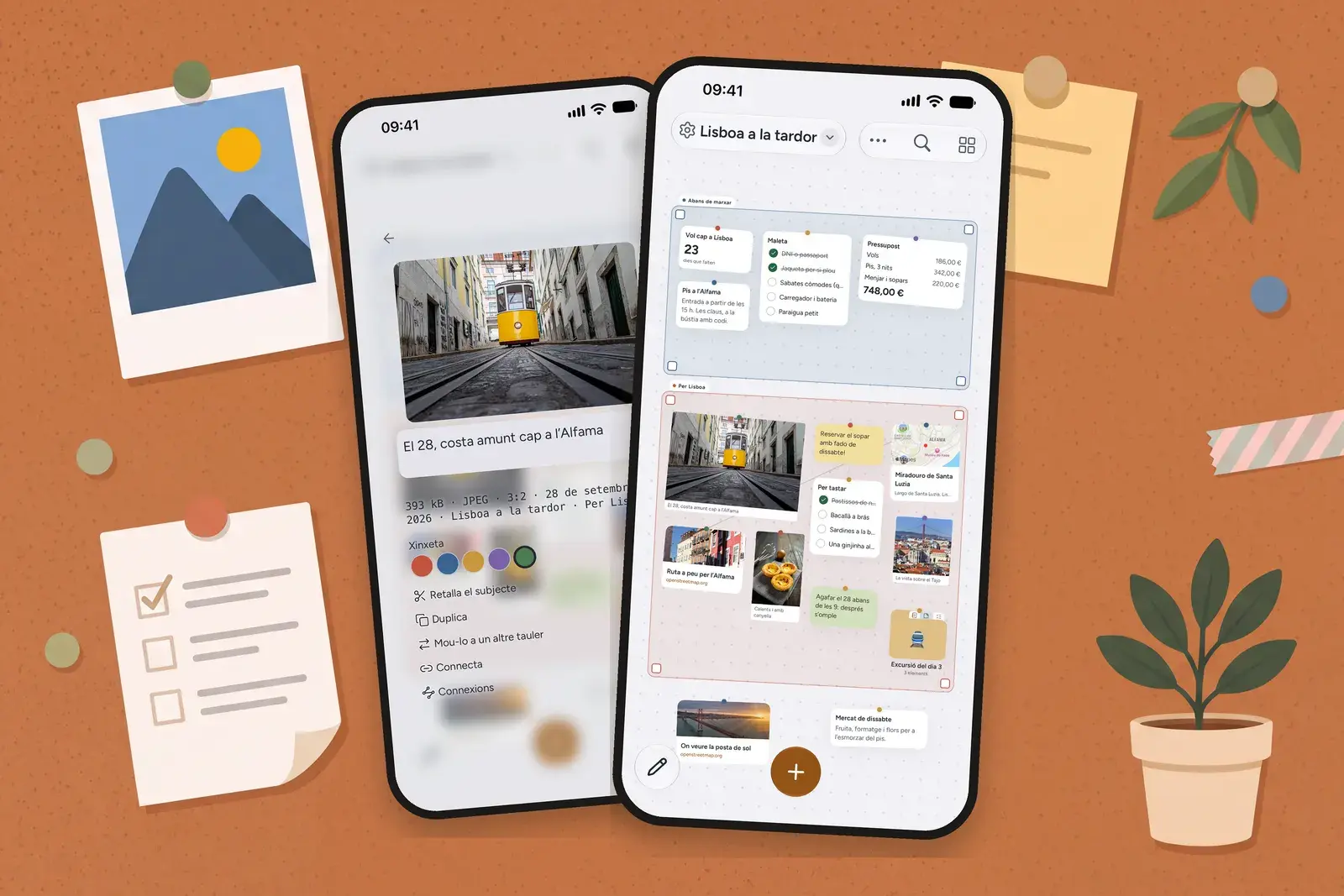
Building an app means making four decisions before anyone writes code: which platforms it will run on (iPhone, Android, tablet, desktop or web), what the design should be, what it will do with its users' data and how it will be published on the App Store and Google Play, each of which has its own rules and a review process. Cost and timeline depend mainly on those decisions: how many features go into the first version, whether you need user accounts and a server, how many platforms and languages you have to cover, and what each store requires. To make it concrete, we'll use Pattio as an example: an app for organising notes, photos, links and lists that we built at Somia Digital and that is already on the App Store.
What problem should the app solve?
Almost every app project starts the same way: “we've got an idea and don't know where to begin”. The first step isn't choosing a technology but writing, in one sentence, what the app solves and for whom. If that sentence isn't clear, features pile up and the budget spirals.
Pattio's sentence is this: an infinite corkboard where you drop notes, photos, links and lists, move them around with your finger as if they were bits of paper and group them however you like. Save it first; sort it later, if you want to. That leads to concrete decisions: you don't have to create folders or categories before you start, and getting things in has to be easy, whether you share from any other app (Safari, Photos…), drag and drop, or paste whatever is on the clipboard.
Which platforms: iPhone, Android, web or all of them?
This is the decision that weighs most on cost. There are three usual options:
- A single platform (iOS or Android), to validate the idea with the audience most likely to use it.
- iOS and Android at the same time, with a cross-platform codebase or two native apps, depending on the performance and system features you need.
- App plus web: some things work better in the browser, especially when the person who needs to see them doesn't have the app installed.
For Pattio we chose Apple's ecosystem: iPhone, iPad and Apple silicon Macs, as a native app (not a wrapped website) with a proper menu bar and keyboard shortcuts on the Mac. We also added a web piece: when you share a board, whoever gets the link opens it in their browser, looks at it, votes in polls and adds notes without installing or paying for anything. That way, sharing doesn't depend on everyone having the app.
What should app design take into account?
An app isn't used like a website: it's tapped, dragged and opened many times a day. The design should start from an idea people grasp without instructions, and respect the system's gestures and conventions. In Pattio that idea is the corkboard: cards like pinned bits of paper that you rotate with two fingers and that open up from where they sit. There's an animated welcome you can skip and replay, and a dark mode with its own warm palette rather than plain grey.
Accessibility is design too. WCAG 2.2 requires, at level AA, a minimum contrast of 4.5:1 for normal text (success criterion 1.4.3). In Pattio, contrast in both light and dark mode is checked by automated tests, and each board's title, which sits on a background image, works out the overlay it needs from the image's brightness so it never drops below that minimum. If the app is part of a consumer service, such as an online shop, you also need to bear in mind the European Accessibility Act.
Languages are a design decision as well, not a finishing touch: each one adds copy, screenshots and a store listing. Pattio works in thirteen languages, and Catalan isn't a translation but a first-class language.
Privacy and data: what needs deciding before development?
The key question is whether the app needs user accounts. Accounts make syncing across devices or sharing possible, but they bring a server, personal data, a privacy policy and store obligations. The General Data Protection Regulation requires data protection by design and by default (Article 25 of the GDPR): it has to be decided before any code is written, not bolted on at the end.
Here's how we handled it in Pattio:
- The whole app works without an account. Without one, everything stays on the device and nothing goes to the cloud.
- The account is optional and is there for syncing. Private boards are end-to-end encrypted in transit and in storage, with a key that never leaves the user's devices.
- The exception is stated plainly: a shared board can't be encrypted, because the recipient's browser has to be able to read it, and the app says so beforehand.
- Leaving is easy: anyone can download all their data in a single file, free of charge and without contacting anyone, and deleting the account deletes the data from the cloud.
- No ads, and the pseudonymous usage analytics can be switched off in the settings.
The stores ask for this explicitly. Apple requires a link to the privacy policy in the listing and inside the app, the user's consent before collecting data, and a clear explanation of what each permission the app requests (camera, photos, location…) is used for; and if the app lets people create an account, it must also let them delete it from within the app (guideline 5.1.1 of the App Review Guidelines). Google Play likewise requires that accounts can be deleted from within the app, plus a web link to request deletion without having to reinstall it (account deletion requirements). And both stores make you declare what data you collect and why: Apple's privacy labels and Google Play's Data safety section.
What do the App Store and Google Play require to publish an app?
Publishing isn't just uploading a file. You need a developer account on each store, a listing (name, subtitle, description, keywords and screenshots for each screen size and language) and you have to pass review. A few points worth planning for:
- The reviewer must be able to test everything. If the app has a login, Apple asks for an active demo account; a built-in demo mode is only accepted, with prior approval, where there are legal or security reasons (guideline 2.1).
- Purchases and subscriptions: unlocking features inside the app has to go through the store's in-app purchase system (guideline 3.1.1).
- Signing in with Google or social networks: if it's used to set up the main account, Apple requires you to also offer an equivalent option that limits data to name and email and lets people keep their address private, such as Sign in with Apple (guideline 4.8).
- Personal Google Play accounts created after 13 November 2023: before they can publish, they must run a closed test with at least 12 testers opted in for 14 consecutive days (testing requirements).
For Pattio, the notes for Apple's reviewer explain what the app is (an empty corkboard could look like an empty app), that no account is needed and yet how to sign in step by step (with Apple, with Google or with an email address and a six-digit code, no password), the basic gestures, how to test subscriptions in the sandbox and why each permission is requested. And the listing was written around what people actually search for: instead of competing for generic keywords such as “notes”, Pattio presents itself as what it is, a corkboard.
The business model needs deciding at this point too, because the stores have rules about it. Pattio can be used for free, and what people pay for, through an App Store subscription, is more cloud storage, more boards and some extra card types; anyone who receives a shared board never pays.
What drives the cost and timeline of an app?
There's no catalogue price, because two apps with the same label can be very different projects. What makes it vary most is:
- The number of screens and features in the first version. It's the main factor and the one you can adjust the most.
- Whether you need user accounts and a server (syncing, shared data, an admin panel, notifications).
- The platforms: iOS only, iOS and Android, tablet, desktop or web as well.
- Integrations: payments and subscriptions, maps, calendar, camera, your company's systems.
- The privacy and security you need to guarantee (encryption, offline use, data export and deletion).
- Languages and the store material for each one.
- Publishing: preparing the listing and the review rounds.
- Maintenance: new versions of iOS and Android come out every year, and the app has to keep up.
The most effective way to keep costs under control is to start small. Pattio has grown in stages: first the corkboard, the cards and the account with encrypted sync; later came the home screen widgets, the notebook for drawing and the document for writing. A well-scoped first version ships sooner, costs less and lets you decide the rest with real usage data.
What should you be clear about before asking for a quote?
- What problem the app solves and for whom, in one sentence.
- The three or four features it makes no sense without.
- Whether it's for customers, your own team or both.
- Whether it needs user accounts and what personal data it will handle.
- The platforms and languages that are essential from day one.
- Whether it has to connect to tools you already use.
- How it will pay for itself: free, paid, subscription or as a service for your customers.
Got an idea for an app?
At Somia Digital we've been building digital projects for over ten years, more than a hundred so far, and we also develop our own apps, such as Pattio. Our app development page explains how we work, and if you like you can request a guided quote: we'll reply within 24-48 working hours with a fixed-price quote or with any questions we need answered, and help you decide what belongs in the first version. You can also message us on WhatsApp.
Sources: Apple's App Review Guidelines (guidelines 2.1, 3.1.1, 4.8 and 5.1.1) and App Store privacy details; Google Play Console Help on account deletion, Data safety and testing requirements; Regulation (EU) 2016/679 and WCAG 2.2. Information reviewed in October 2026; store rules change often, so check them before you publish.
Frequently asked questions
Do I need to build the app for iPhone and Android at the same time?
Not necessarily. Starting with a single platform, the one your audience uses most, lets you validate the idea with less investment. If you need both from day one, a cross-platform codebase usually works out cheaper than two native apps, although it depends on which system features you need.
What do Apple and Google require to publish an app?
A developer account on each store, a listing with copy and screenshots, a linked privacy policy, a declaration of the data you collect and passing review. If the app lets people create an account, it must also let them delete it from within the app, and Apple's reviewer needs a demo account to test it. On Google Play, personal developer accounts created after 13 November 2023 must first run a closed test with at least 12 testers for 14 consecutive days.
Does my app need users to sign up?
Only if a feature requires it, such as syncing across devices, sharing or storing data on a server. Every account means handling personal data under the GDPR and offering deletion from within the app. Pattio, for example, works fully without an account and keeps accounts for people who want to sync.
What does the cost of an app depend on?
Mainly on the number of screens and features in the first version, whether you need user accounts and a server, the platforms and languages, integrations (payments, maps, company systems), privacy and publishing requirements, and ongoing maintenance. That's why it pays to start with a tightly scoped first version.
Does an app need maintenance after it's published?
Yes. Apple and Google release new versions of their operating systems every year and update their rules often, so the app has to be tested and adapted regularly. It's also wise to set aside time to fix bugs and add improvements based on real usage.
Let's talk about your project
Request a quote